Messaging platforms
Feishu
Feishu (Lark) is a team chat platform used by companies for messaging and collaboration. This plugin connects OpenClaw to a Feishu/Lark bot using the platform’s WebSocket event subscription so messages can be received without exposing a public webhook URL.
Plugin required
Install the Feishu plugin:
openclaw plugins install @openclaw/feishu
Local checkout (when running from a git repo):
openclaw plugins install ./extensions/feishu
Quickstart
There are two ways to add the Feishu channel:
Method 1: onboarding wizard (recommended)
If you just installed OpenClaw, run the wizard:
openclaw onboard
The wizard guides you through:
- Creating a Feishu app and collecting credentials
- Configuring app credentials in OpenClaw
- Starting the gateway
✅ After configuration, check gateway status:
openclaw gateway statusopenclaw logs --follow
Method 2: CLI setup
If you already completed initial install, add the channel via CLI:
openclaw channels add
Choose Feishu, then enter the App ID and App Secret. ✅ After configuration, manage the gateway:
openclaw gateway statusopenclaw gateway restartopenclaw logs --follow
Step 1: Create a Feishu app
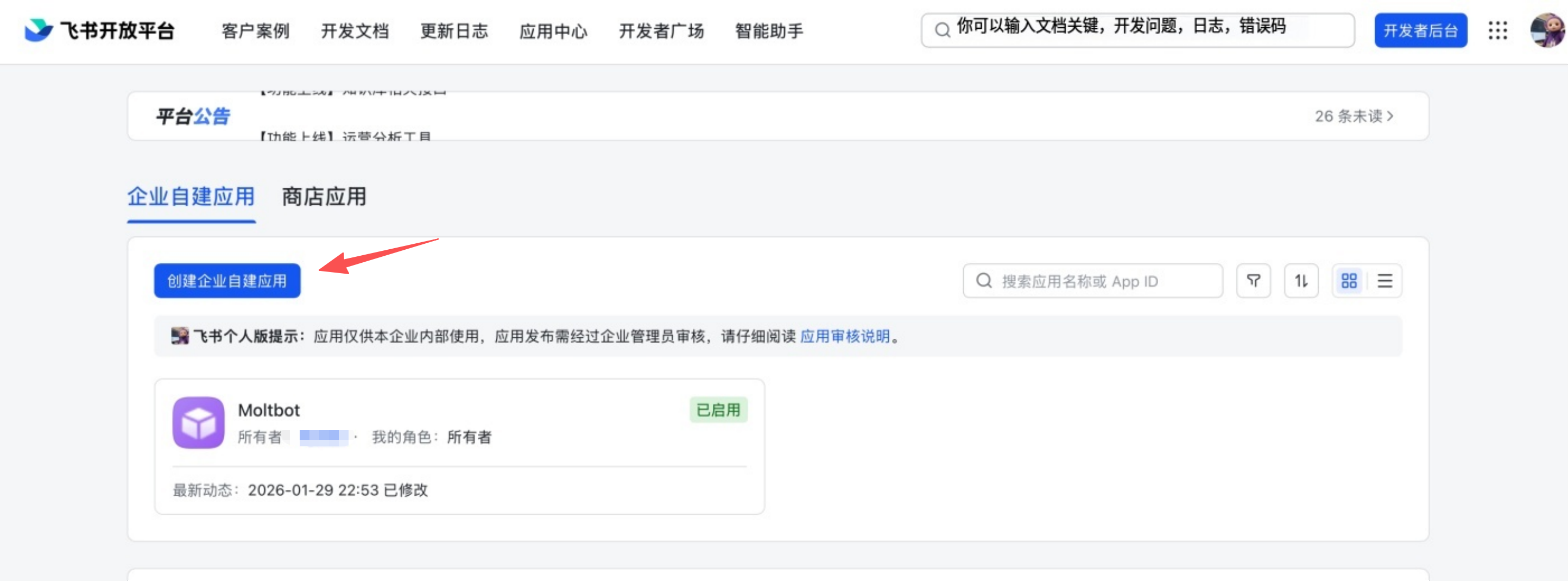
1. Open Feishu Open Platform
Visit Feishu Open Platform and sign in. Lark (global) tenants should use https://open.larksuite.com/app and set domain: "lark" in the Feishu config.
2. Create an app
- Click Create enterprise app
- Fill in the app name + description
- Choose an app icon
3. Copy credentials
From Credentials & Basic Info, copy:
- App ID (format:
cli_xxx) - App Secret
❗ Important: keep the App Secret private. 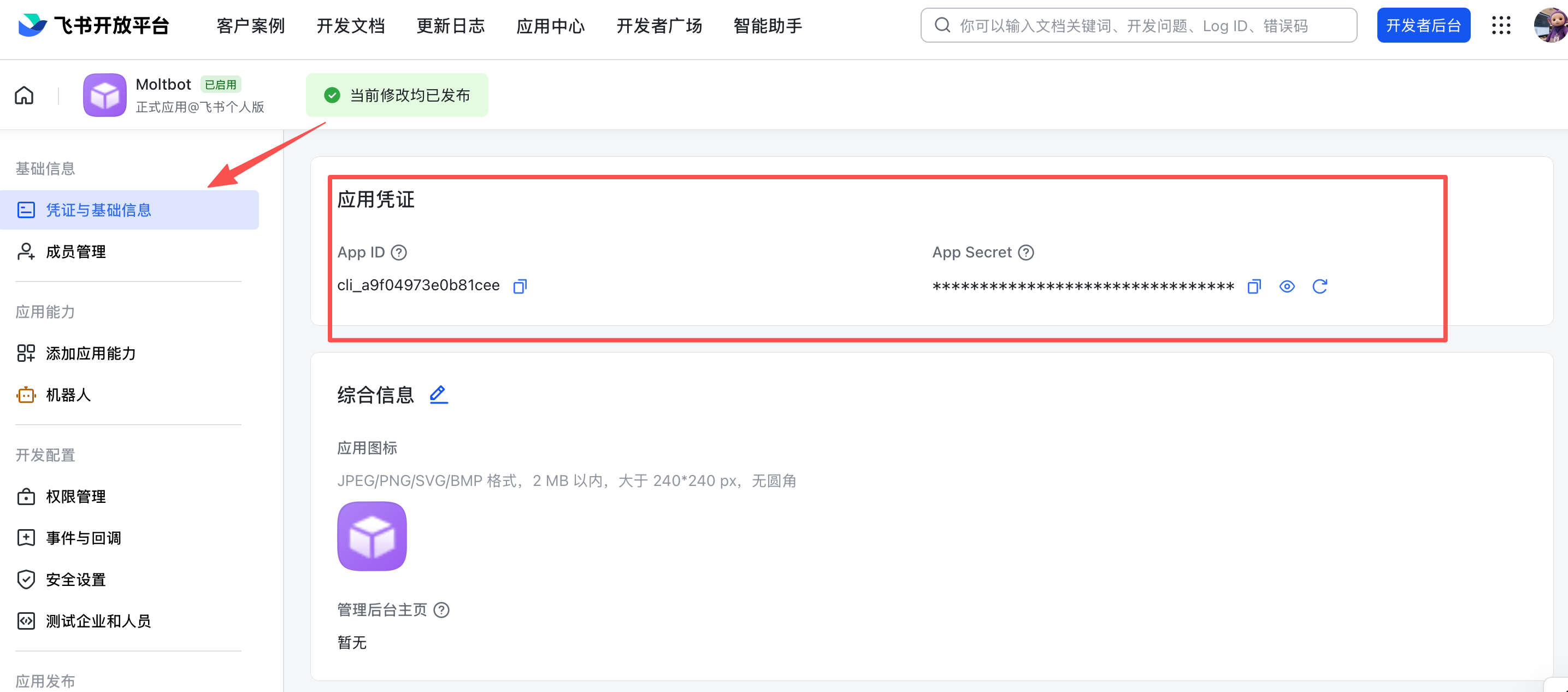
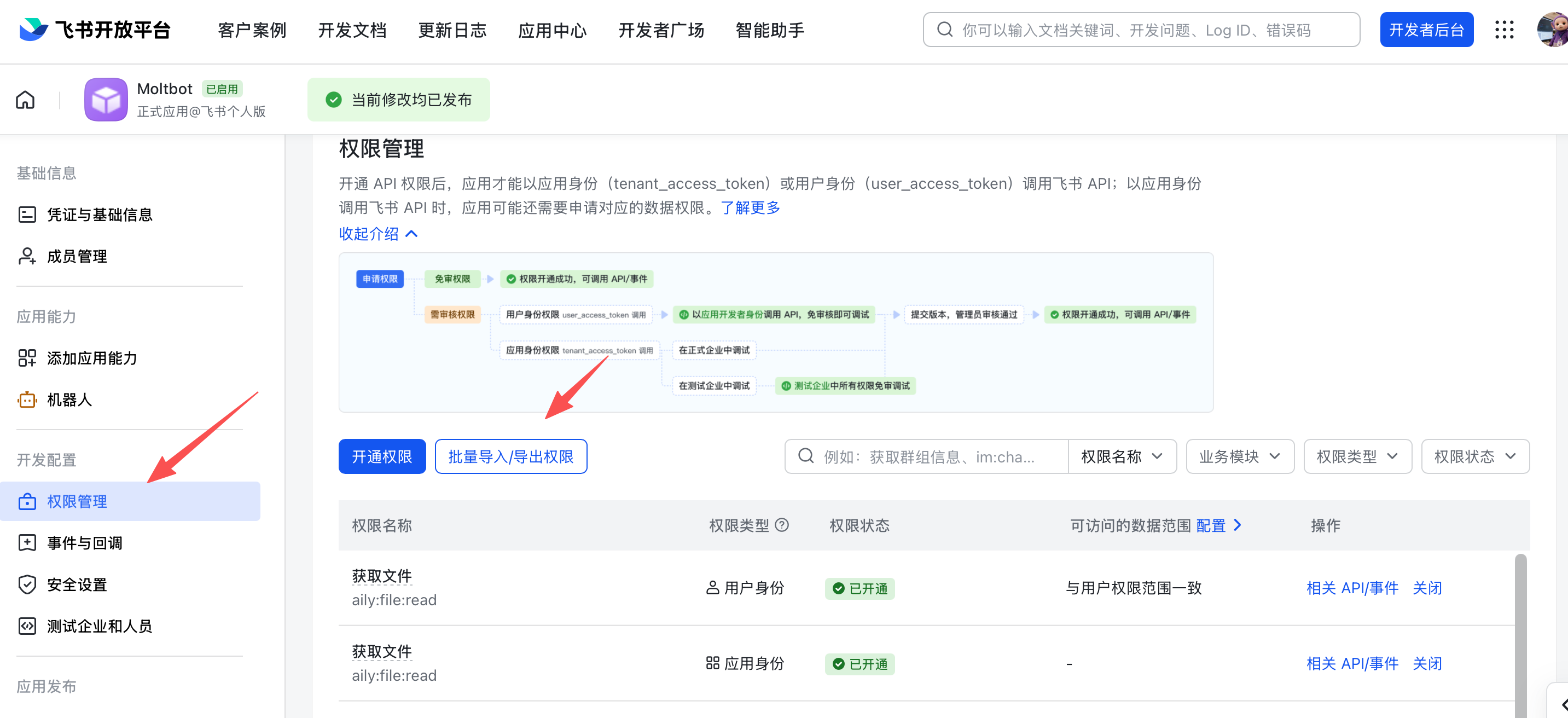
4. Configure permissions
On Permissions, click Batch import and paste:
{
  "scopes": {
    "tenant": [
      "aily:file:read",
      "aily:file:write",
      "application:application.app_message_stats.overview:readonly",
      "application:application:self_manage",
      "application:bot.menu:write",
      "cardkit:card:read",
      "cardkit:card:write",
      "contact:user.employee_id:readonly",
      "corehr:file:download",
      "event:ip_list",
      "im:chat.access_event.bot_p2p_chat:read",
      "im:chat.members:bot_access",
      "im:message",
      "im:message.group_at_msg:readonly",
      "im:message.p2p_msg:readonly",
      "im:message:readonly",
      "im:message:send_as_bot",
      "im:resource"
    ],
    "user": ["aily:file:read", "aily:file:write", "im:chat.access_event.bot_p2p_chat:read"]
  }
}
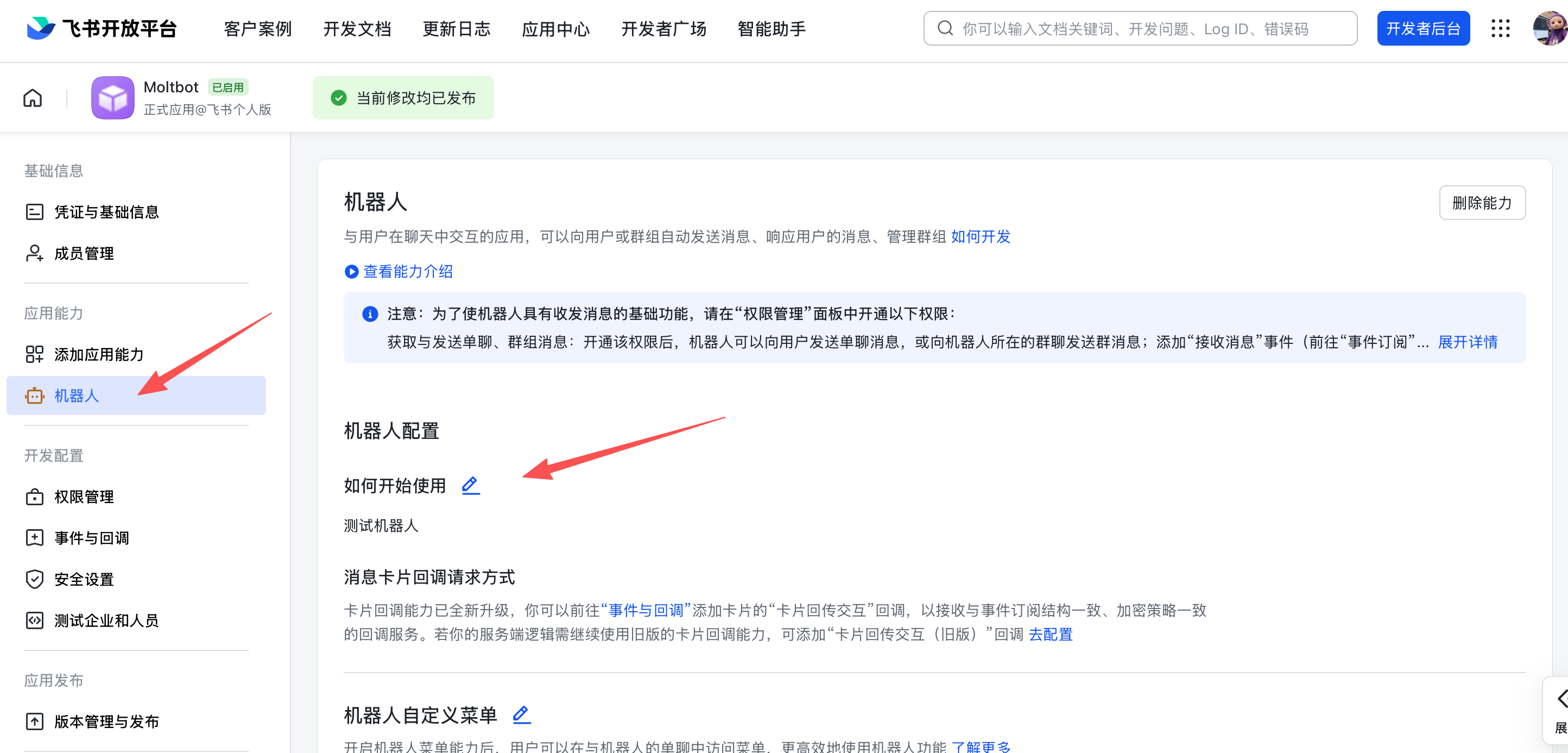
5. Enable bot capability
In App Capability > Bot:
- Enable bot capability
- Set the bot name
6. Configure event subscription
⚠️ Important: before setting event subscription, make sure:
- You already ran
openclaw channels addfor Feishu - The gateway is running (
openclaw gateway status)
In Event Subscription:
- Choose Use long connection to receive events (WebSocket)
- Add the event:
im.message.receive_v1
⚠️ If the gateway is not running, the long-connection setup may fail to save. 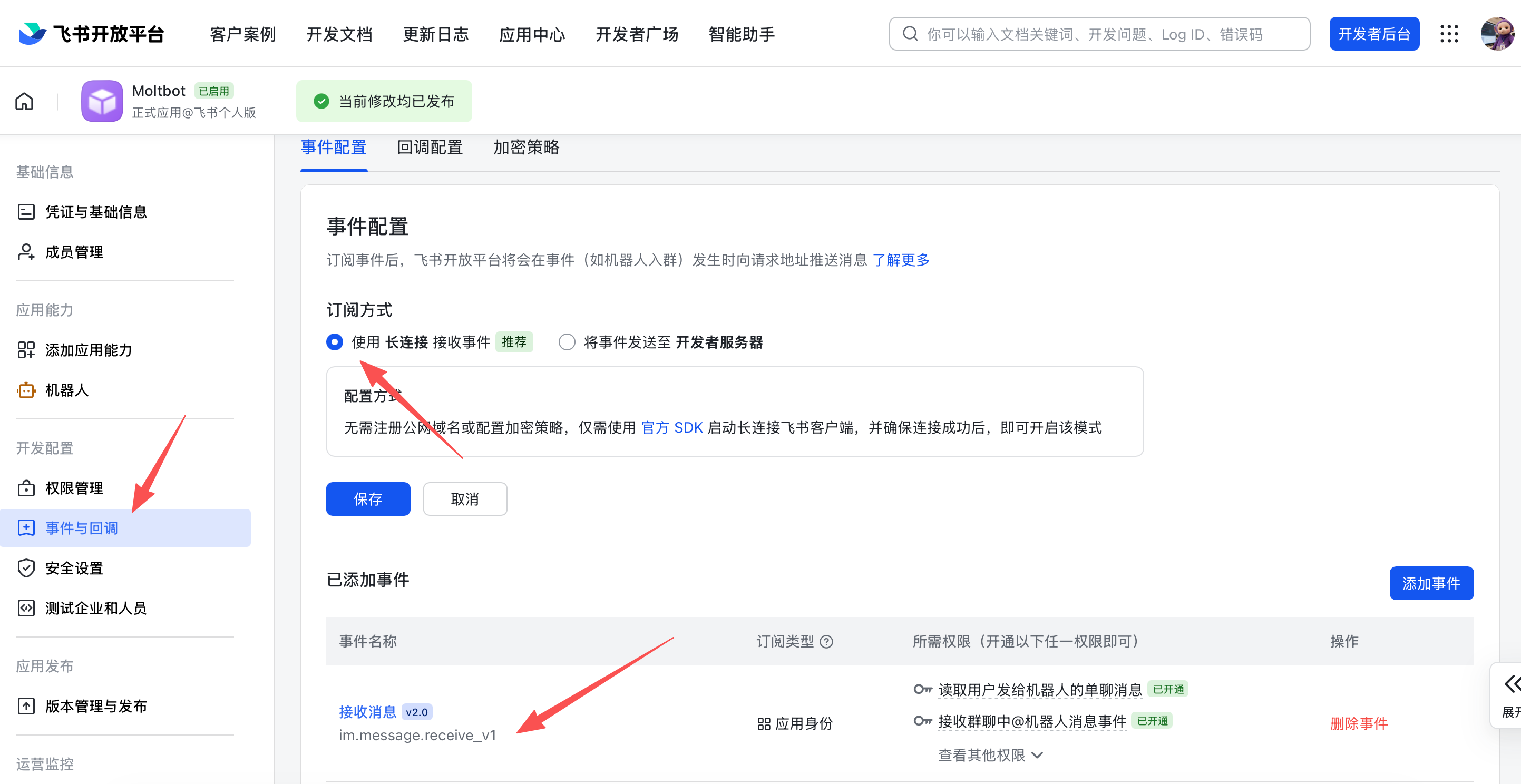
7. Publish the app
- Create a version in Version Management & Release
- Submit for review and publish
- Wait for admin approval (enterprise apps usually auto-approve)
Step 2: Configure OpenClaw
Configure with the wizard (recommended)
openclaw channels add
Choose Feishu and paste your App ID + App Secret.
Configure via config file
Edit ~/.openclaw/openclaw.json:
{
  channels: {
    feishu: {
      enabled: true,
      dmPolicy: "pairing",
      accounts: {
        main: {
          appId: "cli_xxx",
          appSecret: "xxx",
          botName: "My AI assistant",
        },
      },
    },
  },
}
If you use connectionMode: "webhook", set verificationToken. The Feishu webhook server binds to 127.0.0.1 by default; set webhookHost only if you intentionally need a different bind address.
Verification Token (webhook mode)
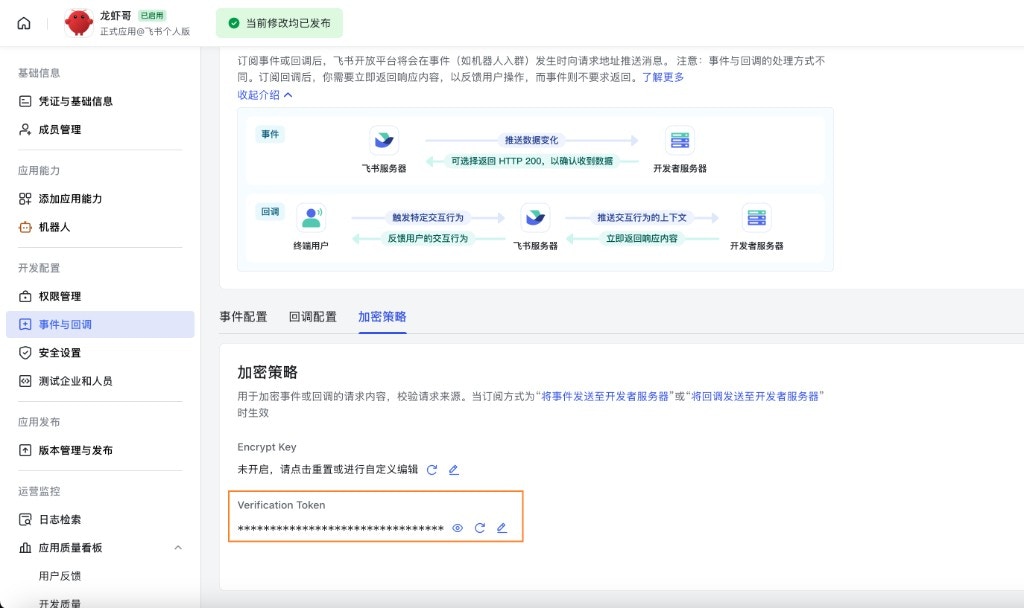
When using webhook mode, set channels.feishu.verificationToken in your config. To get the value:
- In Feishu Open Platform, open your app
- Go to Development → Events & Callbacks (开发配置 → 事件与回调)
- Open the Encryption tab (加密策略)
- Copy Verification Token
Configure via environment variables
export FEISHU_APP_ID="cli_xxx"
export FEISHU_APP_SECRET="xxx"
Lark (global) domain
If your tenant is on Lark (international), set the domain to lark (or a full domain string). You can set it at channels.feishu.domain or per account (channels.feishu.accounts..domain).
{
  channels: {
    feishu: {
      domain: "lark",
      accounts: {
        main: {
          appId: "cli_xxx",
          appSecret: "xxx",
        },
      },
    },
  },
}
Quota optimization flags
You can reduce Feishu API usage with two optional flags:
typingIndicator(defaulttrue): whenfalse, skip typing reaction calls.resolveSenderNames(defaulttrue): whenfalse, skip sender profile lookup calls.
Set them at top level or per account:
{
  channels: {
    feishu: {
      typingIndicator: false,
      resolveSenderNames: false,
      accounts: {
        main: {
          appId: "cli_xxx",
          appSecret: "xxx",
          typingIndicator: true,
          resolveSenderNames: false,
        },
      },
    },
  },
}
Step 3: Start + test
1. Start the gateway
openclaw gateway
2. Send a test message
In Feishu, find your bot and send a message.
3. Approve pairing
By default, the bot replies with a pairing code. Approve it:
openclaw pairing approve feishu <CODE>
After approval, you can chat normally.
Overview
- Feishu bot channel: Feishu bot managed by the gateway
- Deterministic routing: replies always return to Feishu
- Session isolation: DMs share a main session; groups are isolated
- WebSocket connection: long connection via Feishu SDK, no public URL needed
Access control
Direct messages
-
Default:
dmPolicy: "pairing"(unknown users get a pairing code) -
Approve pairing:
Copy
openclaw pairing list feishuopenclaw pairing approve feishu <CODE> -
Allowlist mode: set
channels.feishu.allowFromwith allowed Open IDs
Group chats
1. Group policy (channels.feishu.groupPolicy):
"open"= allow everyone in groups (default)"allowlist"= only allowgroupAllowFrom"disabled"= disable group messages
2. Mention requirement (channels.feishu.groups.<chat_id>.requireMention):
true= require @mention (default)false= respond without mentions
Group configuration examples
Allow all groups, require @mention (default)
{
  channels: {
    feishu: {
      groupPolicy: "open",
      // Default requireMention: true
    },
  },
}
Allow all groups, no @mention required
{
  channels: {
    feishu: {
      groups: {
        oc_xxx: { requireMention: false },
      },
    },
  },
}
Allow specific groups only
{
  channels: {
    feishu: {
      groupPolicy: "allowlist",
      // Feishu group IDs (chat_id) look like: oc_xxx
      groupAllowFrom: ["oc_xxx", "oc_yyy"],
    },
  },
}
Restrict which senders can message in a group (sender allowlist)
In addition to allowing the group itself, all messages in that group are gated by the sender open_id: only users listed in groups.<chat_id>.allowFrom have their messages processed; messages from other members are ignored (this is full sender-level gating, not only for control commands like /reset or /new).
{
  channels: {
    feishu: {
      groupPolicy: "allowlist",
      groupAllowFrom: ["oc_xxx"],
      groups: {
        oc_xxx: {
          // Feishu user IDs (open_id) look like: ou_xxx
          allowFrom: ["ou_user1", "ou_user2"],
        },
      },
    },
  },
}
Get group/user IDs
Group IDs (chat_id)
Group IDs look like oc_xxx. Method 1 (recommended)
- Start the gateway and @mention the bot in the group
- Run
openclaw logs --followand look forchat_id
Method 2 Use the Feishu API debugger to list group chats.
User IDs (open_id)
User IDs look like ou_xxx. Method 1 (recommended)
- Start the gateway and DM the bot
- Run
openclaw logs --followand look foropen_id
Method 2 Check pairing requests for user Open IDs:
openclaw pairing list feishu
Common commands
| Command | Description |
|---|---|
/status | Show bot status |
/reset | Reset the session |
/model | Show/switch model |
Note: Feishu does not support native command menus yet, so commands must be sent as text.
Gateway management commands
| Command | Description |
|---|---|
openclaw gateway status | Show gateway status |
openclaw gateway install | Install/start gateway service |
openclaw gateway stop | Stop gateway service |
openclaw gateway restart | Restart gateway service |
openclaw logs --follow | Tail gateway logs |
Troubleshooting
Bot does not respond in group chats
- Ensure the bot is added to the group
- Ensure you @mention the bot (default behavior)
- Check
groupPolicyis not set to"disabled" - Check logs:
openclaw logs --follow
Bot does not receive messages
- Ensure the app is published and approved
- Ensure event subscription includes
im.message.receive_v1 - Ensure long connection is enabled
- Ensure app permissions are complete
- Ensure the gateway is running:
openclaw gateway status - Check logs:
openclaw logs --follow
App Secret leak
- Reset the App Secret in Feishu Open Platform
- Update the App Secret in your config
- Restart the gateway
Message send failures
- Ensure the app has
im:message:send_as_botpermission - Ensure the app is published
- Check logs for detailed errors
Advanced configuration
Multiple accounts
{
  channels: {
    feishu: {
      defaultAccount: "main",
      accounts: {
        main: {
          appId: "cli_xxx",
          appSecret: "xxx",
          botName: "Primary bot",
        },
        backup: {
          appId: "cli_yyy",
          appSecret: "yyy",
          botName: "Backup bot",
          enabled: false,
        },
      },
    },
  },
}
defaultAccount controls which Feishu account is used when outbound APIs do not specify an accountId explicitly.
Message limits
textChunkLimit: outbound text chunk size (default: 2000 chars)mediaMaxMb: media upload/download limit (default: 30MB)
Streaming
Feishu supports streaming replies via interactive cards. When enabled, the bot updates a card as it generates text.
{
  channels: {
    feishu: {
      streaming: true, // enable streaming card output (default true)
      blockStreaming: true, // enable block-level streaming (default true)
    },
  },
}
Set streaming: false to wait for the full reply before sending.
Multi-agent routing
Use bindings to route Feishu DMs or groups to different agents.
{
  agents: {
    list: [
      { id: "main" },
      {
        id: "clawd-fan",
        workspace: "/home/user/clawd-fan",
        agentDir: "/home/user/.openclaw/agents/clawd-fan/agent",
      },
      {
        id: "clawd-xi",
        workspace: "/home/user/clawd-xi",
        agentDir: "/home/user/.openclaw/agents/clawd-xi/agent",
      },
    ],
  },
  bindings: [
    {
      agentId: "main",
      match: {
        channel: "feishu",
        peer: { kind: "direct", id: "ou_xxx" },
      },
    },
    {
      agentId: "clawd-fan",
      match: {
        channel: "feishu",
        peer: { kind: "direct", id: "ou_yyy" },
      },
    },
    {
      agentId: "clawd-xi",
      match: {
        channel: "feishu",
        peer: { kind: "group", id: "oc_zzz" },
      },
    },
  ],
}
Routing fields:
match.channel:"feishu"match.peer.kind:"direct"or"group"match.peer.id: user Open ID (ou_xxx) or group ID (oc_xxx)
See Get group/user IDs for lookup tips.
Configuration reference
Full configuration: Gateway configuration Key options:
| Setting | Description | Default |
|---|---|---|
channels.feishu.enabled | Enable/disable channel | true |
channels.feishu.domain | API domain (feishu or lark) | feishu |
channels.feishu.connectionMode | Event transport mode | websocket |
channels.feishu.defaultAccount | Default account ID for outbound routing | default |
channels.feishu.verificationToken | Required for webhook mode | - |
channels.feishu.webhookPath | Webhook route path | /feishu/events |
channels.feishu.webhookHost | Webhook bind host | 127.0.0.1 |
channels.feishu.webhookPort | Webhook bind port | 3000 |
channels.feishu.accounts..appId | App ID | - |
channels.feishu.accounts..appSecret | App Secret | - |
channels.feishu.accounts..domain | Per-account API domain override | feishu |
channels.feishu.dmPolicy | DM policy | pairing |
channels.feishu.allowFrom | DM allowlist (open_id list) | - |
channels.feishu.groupPolicy | Group policy | open |
channels.feishu.groupAllowFrom | Group allowlist | - |
channels.feishu.groups.<chat_id>.requireMention | Require @mention | true |
channels.feishu.groups.<chat_id>.enabled | Enable group | true |
channels.feishu.textChunkLimit | Message chunk size | 2000 |
channels.feishu.mediaMaxMb | Media size limit | 30 |
channels.feishu.streaming | Enable streaming card output | true |
channels.feishu.blockStreaming | Enable block streaming | true |
dmPolicy reference
| Value | Behavior |
|---|---|
"pairing" | Default. Unknown users get a pairing code; must be approved |
"allowlist" | Only users in allowFrom can chat |
"open" | Allow all users (requires "*" in allowFrom) |
"disabled" | Disable DMs |
Supported message types
Receive
- ✅ Text
- ✅ Rich text (post)
- ✅ Images
- ✅ Files
- ✅ Audio
- ✅ Video
- ✅ Stickers
Send
- ✅ Text
- ✅ Images
- ✅ Files
- ✅ Audio
- ⚠️ Rich text (partial support)